
For web developers, students, and businesses seeking zero-cost production hosting, learning how to host a website on GitHub Pages is one of the most practical skills in modern web development. Maintained directly by GitHub, GitHub Pages transforms any standard Git repository into a live, globally distributed website backed by fast Content Delivery Networks (CDNs) and automated SSL encryption.
Whether you are publishing a personal portfolio, hosting documentation for an open-source project, or deploying a static business landing page, GitHub Pages eliminates server fees, database maintenance, and manual FTP file transfers. In this visual walkthrough, we cover every step required to publish your site, illustrated with official interface screenshots. If you are comparing broader zero-cost infrastructure, review our guide on where to get free website hosting with no ads.
Step 1: Create Your Repository and Primary Index File

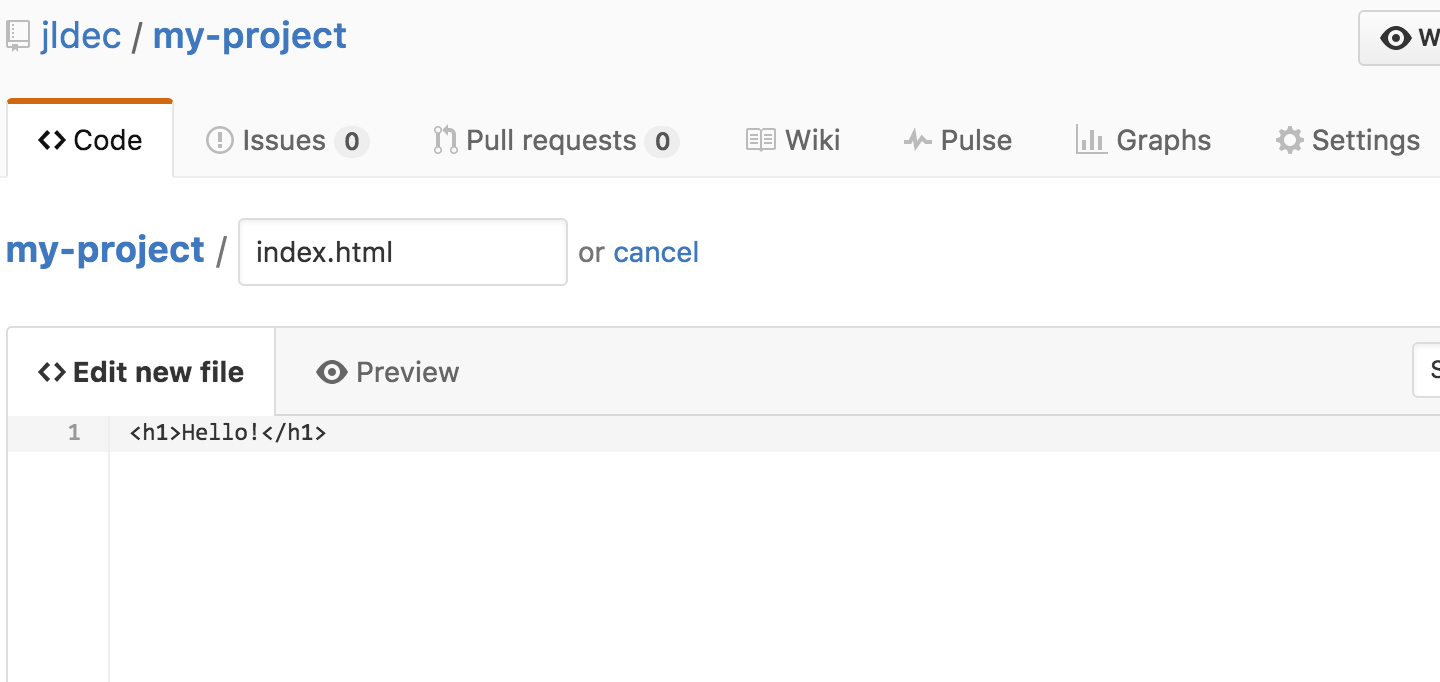
GitHub Pages hosts static assets (HTML, CSS, JavaScript, and images) directly from your code repository. The entry point of your website must be named index.html located in your repository root directory (or inside a designated docs/ folder).
You can create this file locally and push it using Git, or create it directly within the GitHub web interface by navigating to your repository, clicking Add file, and selecting Create new file:
Step 2: Commit Your Code to the Main Branch
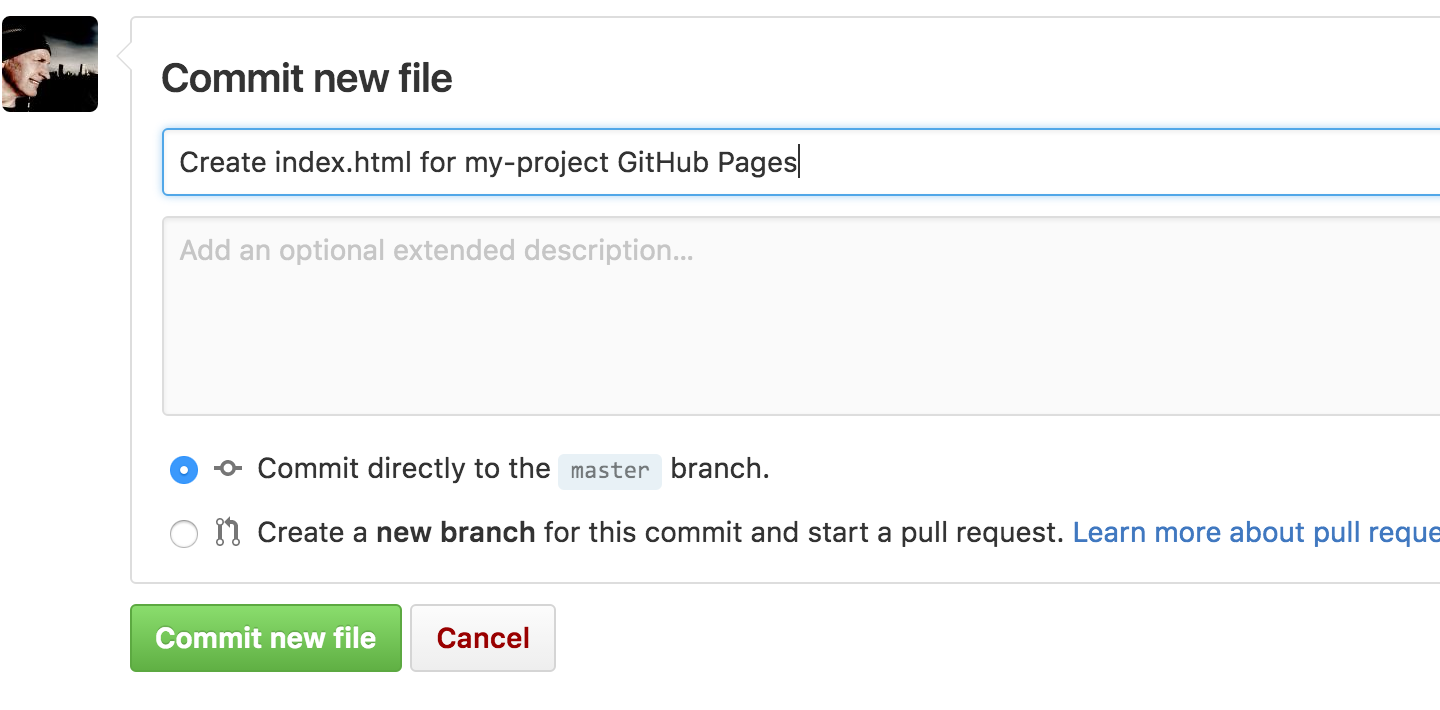
Once you write or paste your HTML structure, scroll down to the bottom of the editor to finalize your changes. Enter a clear commit message (such as "Initial commit for GitHub Pages") and click Commit changes to save your work to the default main branch:
Pro Tip: Repository Naming for Custom Subdomains
If you want your website to live at your primary username URL (e.g., https://username.github.io), name your repository exactly username.github.io. Any other repository name will automatically publish as a project site path: https://username.github.io/repository-name/.
Step 3: Navigate to Repository Settings
With your code committed, open your repository management controls. Click on the Settings tab located in the top navigation bar of your repository:

Step 4: Configure GitHub Pages Source and Deploy
In the left sidebar of the Settings page, scroll down to the Code and automation section and click on Pages. Under the Build and deployment heading, set the deployment source to Deploy from a branch. Select your main branch, leave the folder set to / (root), and click Save:

GitHub will automatically trigger a background deployment pipeline. Within 60 to 90 seconds, a green banner will appear displaying your live public website URL (e.g., https://username.github.io/my-site). If you prefer building automated testing workflows before deployment, review our detailed guide on how to set up CI/CD with GitHub Actions.
Step 5: Connect a Custom Domain (Optional)
While the default github.io domain is convenient, professional businesses and portfolio owners often connect a custom domain name (e.g., www.mybusiness.com):
- In the GitHub Pages settings panel, enter your domain name in the Custom domain field and click Save. This creates a
CNAMEfile in your repository. - Log into your DNS provider (such as Cloudflare or Namecheap) and create a
CNAMErecord pointingwwwtousername.github.io. - For apex domains (
example.com), add fourArecords pointing to GitHub official IP addresses:185.199.108.153,185.199.109.153,185.199.110.153, and185.199.111.153. - Once DNS propagates, check the Enforce HTTPS checkbox in GitHub Pages settings to secure all visitor traffic with a free TLS certificate.
GitHub Pages Specifications and Limitations
The table below summarizes the technical thresholds and features available on GitHub Pages:
| Feature Criteria | GitHub Pages Specification | Developer Impact |
|---|---|---|
| Monthly Bandwidth | 100 GB soft limit per month | Sufficient for moderate to high traffic |
| Repository Size Limit | Up to 1 GB recommended | Avoid committing large raw video files |
| Custom Domain & SSL | Full custom domain support with Let's Encrypt SSL | Enterprise-grade security at zero cost |
| Backend Server Code | Static assets only (HTML, CSS, JS, Jekyll) | Requires external APIs for database logic |
| Build Automations | Native Jekyll or custom GitHub Actions | Compile React, Vue, or Vite apps easily |
Need Custom Web Development or Headless Architecture?
At Selestl Solutions, our engineers build modern static web experiences, performant Jamstack applications, and scalable backend APIs. Discover our specialized custom software development services or contact us directly through our contact page to discuss your technical deployment roadmap.
Launching Your Web Presence on GitHub Pages
Learning how to host a website on GitHub Pages provides developers with a dependable, completely free hosting infrastructure directly tied to version control. Because your site updates automatically whenever you push new commits to your repository, you never have to worry about manual deployments or server maintenance.
For Single Page Applications built with modern frameworks, you can combine GitHub Pages with automated build scripts, giving you a world-class static deployment pipeline at zero cost. To explore more modern frontend deployment options, check our overview of free React deployment platforms.